Are You Making These Common QuickBooks Bookkeeping Mistakes?
QuickBooks is an incredible tool, when it's set up correctly and used the right way. But here's the thing: even the most powerful software can't save you from common bookkeeping mistakes that creep into your records month after month.
We see it all the time. Smart, hardworking business owners who think their books are in decent shape... until tax season rolls around or they need to make a big financial decision. That's when the cracks start to show.
As QuickBooks Advanced Certified ProAdvisors, we've helped dozens of Michigan small businesses clean up these exact messes. And honestly? Most of them could have been avoided with a few simple habits.
Let's walk through the most common QuickBooks mistakes we see, and more importantly, how to fix them before they cost you time, money, or an IRS headache.
Mistake #1: Mixing Personal and Business Funds
This one's a killer, and it happens more often than you'd think.
You grab lunch on your personal credit card but it was technically a business meeting. Or you transfer money from your business account to cover personal expenses "just this once." Before you know it, your business and personal finances are completely tangled together, what accountants call commingling of funds.
Here's why this matters: when your personal and business transactions are mixed in QuickBooks, your financial reports become meaningless. You can't accurately track profit, you can't see true cash flow, and come tax time, you're stuck trying to separate everything out by hand.
Even worse? If you're an LLC or corporation, commingling funds can actually pierce your corporate veil, meaning you could lose the legal protection that separates your personal assets from business liabilities.
The fix: Set up separate bank accounts and credit cards for your business. Period. And if you absolutely need to pay for something personal with business funds (or vice versa), record it properly as an owner draw or capital contribution, not as a business expense.
QuickBooks is an incredible tool, when it's set up correctly and used the right way. But here's the thing: even the most powerful software can't save you from common bookkeeping mistakes that creep into your records month after month.
We see it all the time. Smart, hardworking business owners who think their books are in decent shape... until tax season rolls around or they need to make a big financial decision. That's when the cracks start to show.
As QuickBooks Advanced Certified ProAdvisor’s, we've helped dozens of Michigan small businesses clean up these exact messes. And honestly? Most of them could have been avoided with a few simple habits.
Let's walk through the most common QuickBooks mistakes we see, and more importantly, how to fix them before they cost you time, money, or an IRS headache.
Mistake #1: Mixing Personal and Business Funds
This one's a killer, and it happens more often than you'd think.
You grab lunch on your personal credit card, but it was technically a business meeting. Or you transfer money from your business account to cover personal expenses "just this once." Before you know it, your business and personal finances are completely tangled together, what accountants call commingling of funds.
Here's why these matters: when your personal and business transactions are mixed in QuickBooks, your financial reports become meaningless. You can't accurately track profit, you can't see true cash flow, and come tax time, you're stuck trying to separate everything out by hand.
Even worse? If you're an LLC or corporation, commingling funds can actually pierce your corporate veil, meaning you could lose the legal protection that separates your personal assets from business liabilities.
The fix: Set up separate bank accounts and credit cards for your business. Period. And if you absolutely need to pay for something personal with business funds (or vice versa), record it properly as an owner draw or capital contribution, not as a business expense.

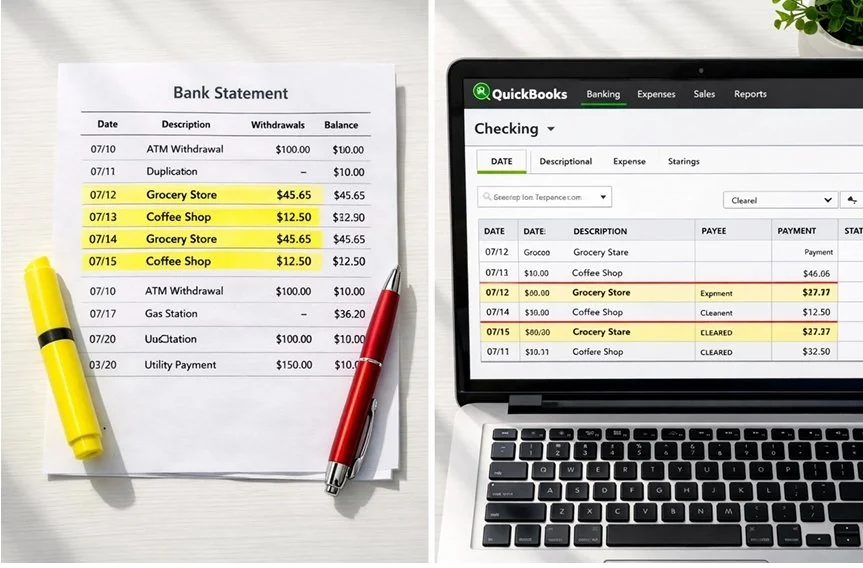
Mistake #2: Creating Duplicate Entries
This is the sneakiest mistake on the list, and it usually stems from QuickBooks' bank feed feature.
Here's the typical scenario: you manually enter a bill payment or write a check in QuickBooks. Then, a few days later, that same transaction shows up in your bank feed. Without thinking, you add it again, boom, duplicate entry.
Now your expenses are inflated, your bank balance doesn't match your actual account, and your profit looks worse than it actually is. Multiply this by dozens of transactions, and suddenly your books are a total mess.
The fix: When reviewing your bank feeds, look carefully at the "Match" column. QuickBooks will usually suggest matching transactions if it finds them. If you see a match, click it, don't create a new transaction.
Also, consider whether you really need to enter things manually if you're using bank feeds. For many businesses, it's easier to let transactions import automatically and then categorize them, rather than entering everything twice.
Mistake #3: Skipping Reconciliations (or Thinking Your Bank Balance Is Enough)
Let's be real: reconciling your accounts isn't fun. It's tedious. It takes time. And if your bank balance looks "about right," it's tempting to skip it.
But here's what we tell every client: reconciliation is your safety net. It's how you catch duplicate entries, missing transactions, and bank errors before they snowball into bigger problems.
When you reconcile, you're comparing your QuickBooks records against your actual bank statement to make sure everything matches. If it doesn't? That's your red flag to dig in and figure out what went wrong.
Think of it this way: your bank balance only tells you how much cash you have right now. Your properly reconciled QuickBooks file tells you how much you actually earned, where your money went, and whether your books are trustworthy.
The fix: Reconcile every account, checking, savings, credit cards, every single month. We recommend doing it within the first week after your statement closes. If something doesn't balance, don't fudge the numbers to make it work. Find the discrepancy. That's where the real problems hide.
Mistake #4: Mis-Categorizing Transactions
This might seem like a small thing, but consistent miscategorization can completely distort your financial picture.
Let's say you sometimes post office supplies to "Office Expenses" and other times to "Supplies." Or you categorize a software subscription as "Dues & Subscriptions" one month and "Technology" the next.
Over time, this inconsistency makes your reports useless. You can't see accurate spending trends, you can't budget effectively, and your tax deductions get messy because expenses aren't properly tracked.
Even worse: some miscategorizations have tax implications. If you accidentally expense a major equipment purchase instead of capitalizing it as a fixed asset, you're distorting your profit and potentially triggering an audit red flag.
The fix: Create a standardized chart of accounts and stick to it. When you're categorizing transactions, ask yourself: "What bucket does this actually belong in?" Not sure? That's when you reach out to your bookkeeper (hey, that's us!) and get clarity.
Also, take advantage of QuickBooks' memorized transactions and bank rules. Once you set the correct category for a recurring vendor, QuickBooks will remember it and suggest the same category next time.
Bonus Mistake: Over-Relying on Auto-Add Rules
QuickBooks is smart, but it's not perfect. The auto-add feature, where transactions automatically get added to your books based on preset rules, can be a huge time-saver... or a huge liability.
The problem? QuickBooks' AI sometimes misidentifies merchants based on confusing transaction descriptions. Your "Amazon Business" purchase might get categorized the same as your personal Amazon Prime order. A subscription renewal might be coded differently than the initial purchase.
If you've set up auto-add rules without regularly reviewing what's getting added, you're essentially letting the software make judgment calls without human oversight.
The fix: Treat the "For Review" tab as your weekly checkpoint. Review every transaction before it gets added to your books. Yes, it takes a few extra minutes, but it prevents months of cleanup work down the road.
Why This Matters (And How We Can Help)
Look, we get it. You started your business to do what you love: not to become a QuickBooks expert. These mistakes aren't happening because you're careless. They're happening because bookkeeping isn't your job.
But here's the reality: messy books lead to bad decisions. They lead to overpaying taxes, missing growth opportunities, and scrambling during audits. They steal your peace of mind.
That's where we come in.
As QuickBooks Advanced Certified ProAdvisors, we don't just clean up mistakes: we set up systems that prevent them from happening in the first place. We reconcile your accounts monthly, catch errors before they compound, and make sure every transaction is categorized correctly.
Our clients sleep better at night knowing their books are accurate, their reports are trustworthy, and their taxes are handled right. That's what we do.
Ready to Clean Up Your QuickBooks?
If you recognized yourself in any of these mistakes, you're not alone: and you're not stuck with messy books forever.
Let's chat about where your QuickBooks stands and how we can get you back on track. Whether you need a one-time cleanup or ongoing monthly bookkeeping, we'll create a plan that actually works for your business.
Get in touch with us today for a FREE consultation. Let's make sure your QuickBooks is working for you: not against you.
Mistake #2: Creating Duplicate Entries
This is the sneakiest mistake on the list, and it usually stems from QuickBooks' bank feed feature.
Here's the typical scenario: you manually enter a bill payment or write a check in QuickBooks. Then, a few days later, that same transaction shows up in your bank feed. Without thinking, you add it again, boom, duplicate entry.
Now your expenses are inflated, your bank balance doesn't match your actual account, and your profit looks worse than it actually is. Multiply this by dozens of transactions, and suddenly your books are a total mess.
The fix: When reviewing your bank feeds, look carefully at the "Match" column. QuickBooks will usually suggest matching transactions if it finds them. If you see a match, click it, don't create a new transaction.
Also, consider whether you really need to enter things manually if you're using bank feeds. For many businesses, it's easier to let transactions import automatically and then categorize them, rather than entering everything twice.
Mistake #3: Skipping Reconciliations (or Thinking Your Bank Balance Is Enough)
Let's be real: reconciling your accounts isn't fun. It's tedious. It takes time. And if your bank balance looks "about right," it's tempting to skip it.
But here's what we tell every client: reconciliation is your safety net. It's how you catch duplicate entries, missing transactions, and bank errors before they snowball into bigger problems.
When you reconcile, you're comparing your QuickBooks records against your actual bank statement to make sure everything matches. If it doesn't? That's your red flag to dig in and figure out what went wrong.
Think of it this way: your bank balance only tells you how much cash you have right now. Your properly reconciled QuickBooks file tells you how much you actually earned, where your money went, and whether your books are trustworthy.
The fix: Reconcile every account, checking, savings, credit cards, every single month. We recommend doing it within the first week after your statement closes. If something doesn't balance, don't fudge the numbers to make it work. Find the discrepancy. That's where the real problems hide.
Mistake #4: Mis-Categorizing Transactions
This might seem like a small thing, but consistent miscategorization can completely distort your financial picture.
Let's say you sometimes post office supplies to "Office Expenses" and other times to "Supplies." Or you categorize a software subscription as "Dues & Subscriptions" one month and "Technology" the next.
Over time, this inconsistency makes your reports useless. You can't see accurate spending trends, you can't budget effectively, and your tax deductions get messy because expenses aren't properly tracked.
Even worse: some miscategorizations have tax implications. If you accidentally expense a major equipment purchase instead of capitalizing it as a fixed asset, you're distorting your profit and potentially triggering an audit red flag.
The fix: Create a standardized chart of accounts and stick to it. When you're categorizing transactions, ask yourself: "What bucket does this actually belong in?" Not sure? That's when you reach out to your bookkeeper (hey, that's us!) and get clarity.
Also, take advantage of QuickBooks' memorized transactions and bank rules. Once you set the correct category for a recurring vendor, QuickBooks will remember it and suggest the same category next time.
Bonus Mistake: Over-Relying on Auto-Add Rules
QuickBooks is smart, but it's not perfect. The auto-add feature, where transactions automatically get added to your books based on preset rules, can be a huge time-saver... or a huge liability.
The problem? QuickBooks' AI sometimes misidentifies merchants based on confusing transaction descriptions. Your "Amazon Business" purchase might get categorized the same as your personal Amazon Prime order. A subscription renewal might be coded differently than the initial purchase.
If you've set up auto-add rules without regularly reviewing what's getting added, you're essentially letting the software make judgment calls without human oversight.
The fix: Treat the "For Review" tab as your weekly checkpoint. Review every transaction before it gets added to your books. Yes, it takes a few extra minutes, but it prevents months of cleanup work down the road.

Why This Matters (And How We Can Help)
Look, we get it. You started your business to do what you love: not to become a QuickBooks expert. These mistakes aren't happening because you're careless. They're happening because bookkeeping isn't your job.
But here's the reality: messy books lead to bad decisions. They lead to overpaying taxes, missing growth opportunities, and scrambling during audits. They steal your peace of mind.
That's where we come in.
As QuickBooks Advanced Certified ProAdvisors, we don't just clean up mistakes: we set up systems that prevent them from happening in the first place. We reconcile your accounts monthly, catch errors before they compound, and make sure every transaction is categorized correctly.
Our clients sleep better at night knowing their books are accurate, their reports are trustworthy, and their taxes are handled right. That's what we do.
Ready to Clean Up Your QuickBooks?
If you recognized yourself in any of these mistakes, you're not alone: and you're not stuck with messy books forever.
Let's chat about where your QuickBooks stands and how we can get you back on track. Whether you need a one-time cleanup or ongoing monthly bookkeeping, we'll create a plan that actually works for your business.
Get in touch with us today for a FREE consultation. Let's make sure your QuickBooks is working for you: not against you.